Now that I have completed both my ancillary tasks and my music video, I need to start thinking about how I will evaluate my overall project.
I decided that instead of writing my evaluation onto my blog, that I wanted to record myself speaking to a camera and the examiner. By doing this, I am able to include all that I need to say while showing my video and ancillary tasks at the same time. This will allow me to explain myself in a more analytical way, whilst annotating my product first hand.
Before filming for my evaluation, I decided that it was a good idea to have a plan of things to include when answering the four questions in my evaluation. By doing this, I will be aware of everything I need to include when speaking about my product.
Showing posts with label Planning. Show all posts
Showing posts with label Planning. Show all posts
Tuesday, 29 November 2011

Wednesday, 2 November 2011
ANCILLARY TASK 2 - POSSIBLE IMAGES FOR MY ADVERTISEMENT
Before starting to create my music magazine advertisement I need to think about what image to use as the main subject of the advertisement. This is vital because it needs to be representative of the album, while still showing continuity in relation to both the CD cover and the album/music video that it will be advertising.

This is an image that I could possibly use for my advertisement. This image would be good because it is representative of my CD cover, which links directly to this, in regards to location and image of the artist but also to the music video.
I like this image because it shows the artist directly looking at the audience, and shows clear focus on the artist and her persona. Through this image it is clear to see what she is representing and the persona created for her in the music video.
As well as this, this image will be ideal because the focus of the location has a direct link to the CD cover. This is often seen in music advertisements, when promoting the CD album.
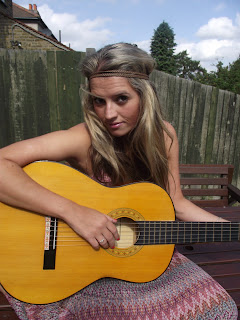
This is another possible image for my magazine advertisement. Again, this image links and is representative of my music video and CD product. This is vital because it enables a clear connection between the advertisement and the video for the target audience to be able to recognise. This image gives clear focus on the artist, who is the subject throughout.
The only problem with this is the background of the image, where the colour is not appealing. This affects the image because it will not stand out to the audience when promoting.

This is an image that I could possibly use for my advertisement. This image would be good because it is representative of my CD cover, which links directly to this, in regards to location and image of the artist but also to the music video.
I like this image because it shows the artist directly looking at the audience, and shows clear focus on the artist and her persona. Through this image it is clear to see what she is representing and the persona created for her in the music video.
As well as this, this image will be ideal because the focus of the location has a direct link to the CD cover. This is often seen in music advertisements, when promoting the CD album.

The only problem with this is the background of the image, where the colour is not appealing. This affects the image because it will not stand out to the audience when promoting.
Tuesday, 1 November 2011
ANCILLARY TASK 2 - ORIGINAL PLAN FOR MY ADVERTISEMENT
Again, I decided to create an original and rough outline plan on paper for my advertisement. I did this because it was useful when using it for my CD cover and decided that again it would allow me to have a rough idea of what I needed to include on my advertisement. This is likely to change through the process.


This is a rough outline to show what I am expecting my advertisement to look like. Though it is likely to change through the process of creating it, I would like to include some or all of the things I have written here.
The main image will be of my artist and I will continue the continuity in regards to the colours, by using red and white and the persona/images used. This refers to what the artist will wear, the location and any equipment e.g. guitar.
I plan to include a critics opinion e.g. from a newspaper or a specific company e.g NME. These are often seen on magazine advertisements because it shows a reliable source and promotes the album to the target audience.
ANCILLARY TASK 1 - CREATING A TRACK LIST
When creating my Back cover, I knew that it was essential for me to include a track list of the songs that would be included in the album.
Knowing the first song would be called 'Back to December', I decided to start from the title of this song and referring back to the music video and the overall idea of the CD product, I started to brainstorm ideas that would link well to this.

This is my brainstorm.
I decided, after looking at the title 'Back to December' to look and create song titles that link to the seasons or the idea of a love story. When deciding what songs to use, I thought about creating a story of its own within the track list titles, which Is why I decided to use 'Summer Moved On' as the final track on the list. This shows that the artist is 'moving on' from the past, after all of the other songs throughout the list, which could link to the love story of the couple. This links back to the music video created.
Knowing the first song would be called 'Back to December', I decided to start from the title of this song and referring back to the music video and the overall idea of the CD product, I started to brainstorm ideas that would link well to this.

This is my brainstorm.
I decided, after looking at the title 'Back to December' to look and create song titles that link to the seasons or the idea of a love story. When deciding what songs to use, I thought about creating a story of its own within the track list titles, which Is why I decided to use 'Summer Moved On' as the final track on the list. This shows that the artist is 'moving on' from the past, after all of the other songs throughout the list, which could link to the love story of the couple. This links back to the music video created.
ANCILLARY TASK 1 - IMAGES OF GUITARS

Though in spite of this, I would prefer the background to be a grassy scene. This is to carry on the continuity from the music video. It would also make it look more 'country' which is the genre of the song.

This image is clear but I don't like it because its not very bright and the back of the guitar makes the image seem even darker.

I like this image, but I don't know if it would be suitable because I would need to include writing. This image is appealing and stands out to the audience, but I think with writing and other information, it may be too overcrowded.
 This is one of my favourite images. I like this image because the guitar is clearly shown but doesn't take up the whole image. I like that to the right of the image, there is space for writing to be placed and that the background is grass, representing continuity.
 Though this is my favourite image, I may edit it to make it brighter.
ANCILLARY TASK 1- IDEAS FOR THE BACK COVER OF MY CD COVER


As I didn't end up using either of these images taken on the front of my CD cover, I originally decided that it would be a good idea to use one of these on the back cover.
I originally decided to use the image on the left and cut round the artist to use on the back cover.
I originally decided to use the image on the left and cut round the artist to use on the back cover.
Though this was my original plan, I decided to change this and make the back cover more creative. With this in mind I am thinking of using an image of the guitar I used as the subject of the back page. This will still link to the artist and the album but will create something different than just having an image of the artist.
These are some images I have taken of the guitar to start creating some ideas for my back cover. I initially thought about just using the back of the guitar to write the track list on. This would make it easier to read because there are no strings but still be effective because you will be able to see the shaping of the guitar.
Thinking more into the idea, I decided that I could use the front of the guitar to write the track list on the strings of the guitar.
I will have to look at both of these ideas to decide which I would like to choose and which would be more effective for the audience.
Wednesday, 12 October 2011
ANCILLARY TASK 1 -CHANGE OF PLAN
After thinking about the two images I initially chose to use on my CD cover, I watched my video and decided to use a shot from there instead. To do this, I am going to try and print screen a shot from my video. I think this will be a good idea because it will seem more natural, which is a image that I would quite like to portray on my cover.
Though this is a possiblity, I will still try and still incorporate both of the other two images into my CD cover and other ancillary tasks.
These are the possible shots that I can use that I have saved from my video:


 I also print screened this image from my music video. I like the idea of using an image from my music video because it shows contiunity and represents the main track on the album. I think this image would look good on the front cover of the CD because it connotes the artist searching for something or looking back in the past. This is ideal because I plan for my album to represents this idea.
Though this is a possiblity, I will still try and still incorporate both of the other two images into my CD cover and other ancillary tasks.
These are the possible shots that I can use that I have saved from my video:

I like this image because it is natural instead of posed connoting a sense of freedom and represents the album to be somewhat care free. It would be a good idea to use this image because it shows continuity in regards to the video as this is the main scene and persona of the artist throughout. As well as this, the image is bright and uses the guitar as an extra element.

I also like this image, which is a snapshot from my music video. This image is also quite natural, though it may look serious here. It represents the artist well with a close up of her face, but still shows continuity in regards to the background and the persona of the artist.
 I also print screened this image from my music video. I like the idea of using an image from my music video because it shows contiunity and represents the main track on the album. I think this image would look good on the front cover of the CD because it connotes the artist searching for something or looking back in the past. This is ideal because I plan for my album to represents this idea.
ANCILLARY TASK 1- POSSIBLE IMAGES FOR MY ALBUM COVER
 Another option I have for the front cover of my album cover is this image.
I like this image because it links nicely to my music video, including the guitar and a location that I used in my video.
Again, the image is ideal because it is landscape.In comparison to the other image, this one is more posed as the artist is looking towards the camera instead of away from it. In one way, I like this, but I feel that it may be more attractive to use the natural posed image.
ANCILLARY TASK 1- POSSIBLE IMAGES FOR MY ALBUM COVER

This is a possible image that I could use for my album cover. I like this image because it is natural looking and the use of the guitar is a link to the genre and the album, especially the song that I am filming for.
As I would like my song to be the feature song of the album, this image is suitable to denote the song and the genre of the narrative and song itself.
I also think that it would be ideal to use because she is not looking at the camera, so it looks natural and it is taken landscape and not portrait, which is ideal for a front cover.
As I would like my song to be the feature song of the album, this image is suitable to denote the song and the genre of the narrative and song itself.
I also think that it would be ideal to use because she is not looking at the camera, so it looks natural and it is taken landscape and not portrait, which is ideal for a front cover.
Tuesday, 11 October 2011
ANCILLARY TASK 1 - ORIGINAL PLAN FOR ALBUM COVER
After starting to research album covers and before starting to create it, I decided to make a rough outline of what I would like to include on the front, back and inside of the CD cover. By doing this, I am allowing myself to have a plan that I could follow to some extent while working on this ancillary task.
Though I am likely to change my ideas throughout the process, this enables me to have an idea in my head of what I would like my CD album to look like.

Though I am likely to change my ideas throughout the process, this enables me to have an idea in my head of what I would like my CD album to look like.

USING THE GREYSCALE EFFECT
When editing my Music video I decided to use the greyscale effect. This was to be used on the shots that are referring back to the past.
Luckily enough, this was an easy option which I could edit through the programme I used.
By changing the colour of the shots, the video becomes more varied as well as becoming effective for the audience. The difference in effects represents the clear idea between past and present, whilst greyscale effect is commonly used in music videos because it is a common and recognisable effect.

Luckily enough, this was an easy option which I could edit through the programme I used.
By changing the colour of the shots, the video becomes more varied as well as becoming effective for the audience. The difference in effects represents the clear idea between past and present, whilst greyscale effect is commonly used in music videos because it is a common and recognisable effect.

This is how I would include the effect into my Music Video.
CAMERA ANGLES
It is also essential that I try and use a variety of camera angles in my music video. These include:
High Angle Shots - These can be used throughout my video. This can represent power but also gives variety to the shots.
Low Angle Shots - These shots can also be used variously throughout my video. A low angle can represent vulnerability which links broadly to my narrative and song.
Eye-Level Shots - This is the most common shot I will use. It is a neutral shot that allows the audience to see the actor in a daily,reallife situation.
Bird's Eye Shot - This is a shot from above the actor. This is used to to show a different angle perspective. In regards to my video, I can use this angle on my artist.
It is important that I try to include almost all of these shots to allow me to have a variety of angles. This will give my video variety and create a well developed personna of the actor.
High Angle Shots - These can be used throughout my video. This can represent power but also gives variety to the shots.
Low Angle Shots - These shots can also be used variously throughout my video. A low angle can represent vulnerability which links broadly to my narrative and song.
Eye-Level Shots - This is the most common shot I will use. It is a neutral shot that allows the audience to see the actor in a daily,reallife situation.
Bird's Eye Shot - This is a shot from above the actor. This is used to to show a different angle perspective. In regards to my video, I can use this angle on my artist.
It is important that I try to include almost all of these shots to allow me to have a variety of angles. This will give my video variety and create a well developed personna of the actor.
CAMERA MOVEMENT
As well as Camera shots, it is a good idea to have a range of camera movements. By doing this, it will allow my video to be full of variation, but also so that the music video can run smoothly to the music
Camera movements that I can include are:
Camera movements that I can include are:
- Follow - This is when the camera follows the subject from a distance. This can be used to emphasise the movement and normality of the subject (in my case). It also represents the subject from the POV of someone else.
- Pan - The pan movement is a movement from right to left. This would be good to use because it highlights the subject and brings variety to the video.
- Tilt - A tilt would add variety to the music video because it adds in a different movement of the camera.
- Zoom - Zooming in or out of the subject will give emphasis on it as well as connoting the emotions of the subject and highlighting specific themes of the music video.
- Track - A tracking shot stays a constant distance from the subject and 'tracks' the subject. This will also allow my video to become more interesting while allowing the audience to feel as if they are involved within the music video.
CAMERA SHOTS
For my music video to be successful, it is important to have a variety of camera shots used throughout the video.
These include:
These include:
- Close up Shots - I will be able to use these shots in close ups of the artist or either of the narrative actors. It would also be an idea to use close up shots on the guitar that I was going to use for my artist. This will bring emphasis on the music and the artist.
- Mid shots- These will be used throughout my video for both the song and the narrative.
- Long Shots - I plan on using Long shots in various ways. It would be ideal to use a long shot to represent the artist and these will be used when walking and for different movement shots.
- Extreme Close up- These could be used on various occasions, including the eyes of the singer or actors in the narratives.
- POV Shot- It would be useful to use a POV shot in my video because it shows the audience the perspective of the artist. Though this may not be relevant to my music video, I will try to include this shot to create variety.
- Cut In/Cut Away Shots - By using a cut in, focusing on another area of the subject or a cut away,focusing on something that is not the subject, variety would be included in the video as well as representing other ideas that link to the narraive e.g. hand hold
- Over the shoulder Shot - This shot will be useful to establish the location of both my actors in the video and to recognise the POV of one of the actors in reaction to the other.
- Establishing shots - I can use these shots to represent the setting and location.
Monday, 10 October 2011
COSTUMES AND PERSONNA OF ACTORS
My Female Actor
The main actor in my music video, which will be played by my sister, has two different roles to play in the video, including a change in costume and personality.
- In the shots that involve her being the artist of the video, I plan for her to look summery, showing a significant time difference since the couple supposedly broke up. By doing this, it also allows me to have a clear difference between the two scenes I will film.
For this to happen successfully, it is important that I think about the weather and choose a suitable day to film e.g. A day that it is sunny and not raining. Also, to successfully achieve this, I need to think about the costume for my actor. My initial ideas include summery dresses, particularly a maxi dress. This will be ideal because it will look good within fields/grass (idyllic setting) and will clearly connote the mood and the 'summer' feel to the shots.
During these shots, it is important that my actor looks solemn and regrets the decision she made in the past.
- In the other scene, in which my main actor is joined by the male lead, it is essential that the shots are set in cold weather, which can be clearly shown through a suitable costume. My initial ideas for costume include winter wear, including jumpers, coats, scarves and hats etc. This allows the audience to get the idea that the weather would be cold- referring to December.
I would need the weather to be dull and grey, but not to be raining for most of the shots, so it is important that I choose certain days and check weather forecasts to achieve this.
I would like for the weather to be snowy because it would clearly represent 'December' to the audience, but due to the time of the year, this is not always likely.
During these scenes, it is essential that the actor is happy and carefree to beable to contrast directly to the mood of the actress in the other scenes.
- My male actor is only to appear in flashback shots. In these it is important that the same requirements are used for that of my female actor. This will show continuity and allow the two of the actors to be representing the same ideas.
NARRATIVE OF MY MUSIC VIDEO
The main narrative for my music video involves a young couple who have recently (in December) broken up.
The song shows that the girl involved in the narrative(and who is in fact my artist also) was the reason for the break up, but she is now the one who is regretting her decision and wants to go back to what the two of them shared.
With this in mind, I will show the girl singing in a summer climate, because she is looking back in the past and have various shots that will represent flashbacks to 'December' throughout the song, involving both her and her 'ex' boyfriend.
This is the rough outline of my narrative, which I plan to expand and emphasise throughout my video.
This is the rough outline of my narrative, which I plan to expand and emphasise throughout my video.
Friday, 23 September 2011
STORY BOARDS
Before I start filming for my final video, I think it would be a good idea to create a storyboard for my video. This will allow me to figure out what footage I need and the different shot types and camera movements i will have. By doing this, I can understand if I have enough variety of shots and how much I will need to film.
It is likely that this will change while creating my music video, due to adding in new shots, fitting the shots with the song and various other reasons.
Here is my final storyboard:


It is likely that this will change while creating my music video, due to adding in new shots, fitting the shots with the song and various other reasons.
Here is my final storyboard:


This is my rough, first edition of my video. Though this is basic, it will be very useful for me when I start to create my music video when deciding and filming specific shot types and camera movements. Throughout the process of filming, creating and editing for my music video, this storyboard is likely to have changed to a certain extent. I am not expecting this storyboard to be parallel to my final music video because it is likely that I will change my mind throughout the process.
Monday, 12 September 2011
FINDING ACTORS TO USE
Now that I had decided on a song and had an idea of various settings that I will possibly use, I need to decide who my actors will be and how many of them I will need.
Once choosing my song, I immediatley thought about having my sister for my main actress. Though she is nearly 21, I think that she looks young enough to be in the music video, because I didnt want the actress being too young. I also chose my sister because she has long hair, which is something I wanted for my actress.
As the song I have chosen is related to a relationship, I decided that it would be good for my sisters real life boyfriend to play her 'ex' boyfriend in the video. I think this is ideal because it will be more comfortable for them to act as a couple in the video.
After realising that I had two actors for the narrative I was to include, I realised that I needed a actress to sing the song itself. I decided that I wanted my sister to be the singer too because this was my original plan.
With regards to this, I figured that it would be a good idea to have my sister play both the singer and the actor in the narrative. This way it will represent her personal story. This is a very common technique that Taylor Swift uses in her videos, including the Back to December video.
 |
| This is my sister, who will be the main actor for my music video. |
 |
| This is Will. He will be my male actor in my music video. |
DECIDING ON A LOCATION FOR MY SINGER
After my feedback on the song choice and starting to come up with ideas to use in my videos, I had to start thinking about different locations to use.
I wanted to use more than one location because the video could become tedious otherwise because the locations add variety to the video.
My first idea was to use a funfair that was happening in Central London at the time. I thought this would be a good idea to film at night time because it could be seen as magical, which would be ideal for a love story. This would be used for the shots that are 'looking back in the past' in my music video. Unfortunatley, once I was ready to film, the fair had moved on and after thinking about it, I realised that the lighting would not be suitable and I would prefer to set my video during the day.
After deciding on this, I wanted my singer and that element of the video to be focused around a country/boohoo chic theme. With this in mind, I decided to use my garden as a starting point.


Not only did the park provide me with a large green spaced area and other elements such as benches that I could incorporate into my video, but there were also woods that I thought would make a change to my settings.

At first I was eager to find a play park because I thought it would be a different setting that could easily connote lonliness. In regards to this, I was unable to find a local play park that had the resources I wanted.
 I also decided to use a bedroom in my house. This was a good location because I wanted a scene that involved the artist crying/being sad and looking at old photos.
I wanted to use more than one location because the video could become tedious otherwise because the locations add variety to the video.
My first idea was to use a funfair that was happening in Central London at the time. I thought this would be a good idea to film at night time because it could be seen as magical, which would be ideal for a love story. This would be used for the shots that are 'looking back in the past' in my music video. Unfortunatley, once I was ready to film, the fair had moved on and after thinking about it, I realised that the lighting would not be suitable and I would prefer to set my video during the day.
After deciding on this, I wanted my singer and that element of the video to be focused around a country/boohoo chic theme. With this in mind, I decided to use my garden as a starting point.
 |
As you can see from this image, there were some challenges and things that could possibly get in the way during my filming. Though the trampoline could be used in some music videos, I did not think that it was suitable for my particular song. With this, I had to work around the different challenges, which limited me to different settings within the garden.
 |
| This is a tree in my garden. I thought this would be good as a scene to use. Though it looks haunting here, In the light I think it will be a good location, which fits in well with the country theme. This will allow me to have a good low angle of my actor/actress. |
With this in mind, I decided that it would be good if I located somewhere else for the singing. I decided to go to the local park, which would be bigger and would provide more space for me to film.


Not only did the park provide me with a large green spaced area and other elements such as benches that I could incorporate into my video, but there were also woods that I thought would make a change to my settings.

At first I was eager to find a play park because I thought it would be a different setting that could easily connote lonliness. In regards to this, I was unable to find a local play park that had the resources I wanted.
 I also decided to use a bedroom in my house. This was a good location because I wanted a scene that involved the artist crying/being sad and looking at old photos.
As well as this, I wanted to use the window seat in my bedroom.. This is an ideal location because I wanted to incorporate a sad scene, which shows the artist looking out of the window.
Thursday, 8 September 2011
ASKING FOR PERMISSION
Before editing and filming for my video, I had to email the record company to ask for permission to use this song. This is essential to stop the use of copyright. The record label that I had to contact was Big Machine Label, who are the record company for Taylor Swift and various other musicians. To contact the record company, I decided to email them, explaining the situation and how I would be using one of their artist' songs for my media coursework.
This is the email I sent to the company:

This is the email I sent to the company:

Subscribe to:
Posts (Atom)